How to Govern AI Agents in Production

An AI agent can call a tool, read the result, and decide what to do next. That makes it useful. It also means one bad decision can repeat at machine speed: another database query, another email, another refund attempt, another billable model call.
Agentic AI governance puts limits around that loop. It can detect repeated behavior, stop a running session, or ask a person to approve a risky tool call before it happens.
The question isn't whether your agents will misbehave. It's whether you'll know when they do, and whether you can stop them before the damage compounds.
This post covers three governance patterns that belong at the infrastructure layer — loop detection, session kill switches, and human-in-the-loop approval gates — and how the DVARA MCP Gateway implements them so your agent code doesn't have to.
Availability. These controls run in the Enterprise MCP Gateway. They run without a licence for non-production use; a licence grants production rights and support.
Updated for 1.8.2. This post originally said a valid licence activates the MCP and A2A planes. In 1.8.2 every feature, the MCP and A2A planes included, runs without a licence for non-production use, within 3 workspaces and 100,000 governed calls a month. A licence removes both limits and gives production rights and support. An expired licence refuses no traffic.
The Problem: Agents Operate in Open-Ended Loops
A traditional API call is request-response. One in, one out. An agentic workflow is fundamentally different: the agent decides which tool to call next based on the result of the previous call. This creates open-ended execution loops where the number of steps is unbounded and unpredictable.
Consider a real scenario:
A customer support agent is tasked with resolving a billing dispute. It pulls the customer record from your CRM, queries the payment history from Stripe, checks the refund policy in your knowledge base, and decides to issue a partial refund. But the refund API returns a validation error — the customer's subscription tier changed mid-cycle. So the agent re-reads the subscription record, re-queries the payment history, re-checks the policy, and tries the refund again. Same error. The agent doesn't understand the error is structural, not transient, so it retries the entire sequence — burning LLM tokens, hitting your payment APIs repeatedly, and potentially creating duplicate refund attempts. By the time someone notices on Monday morning, the agent has made 400+ API calls across three production systems over the weekend.
Now scale this to a multi-agent pipeline:
A lead qualification agent receives an inbound demo request. It enriches the lead by querying your CRM for company data, calls a firmographic API to pull revenue and headcount, and checks your pricing engine for the right tier. The lead qualifies, so it hands off to a pricing agent — which generates a custom quote and passes it to a contract generation agent. But the contract agent hits a template error for this particular product bundle. It asks the pricing agent to re-quote with a different structure. The pricing agent re-queries the firmographic API (the data hasn't changed), recalculates, and hands back. The contract agent fails again on the same template issue. This cycle repeats — pricing → contract → pricing → contract — each iteration burning LLM calls, API credits on your firmographic provider, and compute on your pricing engine. Meanwhile, 50 other leads are queued behind the stuck pipeline. By the time the on-call engineer investigates, the pipeline has consumed $800 in API costs on a single unresolvable lead and blocked an entire morning's worth of sales pipeline processing.
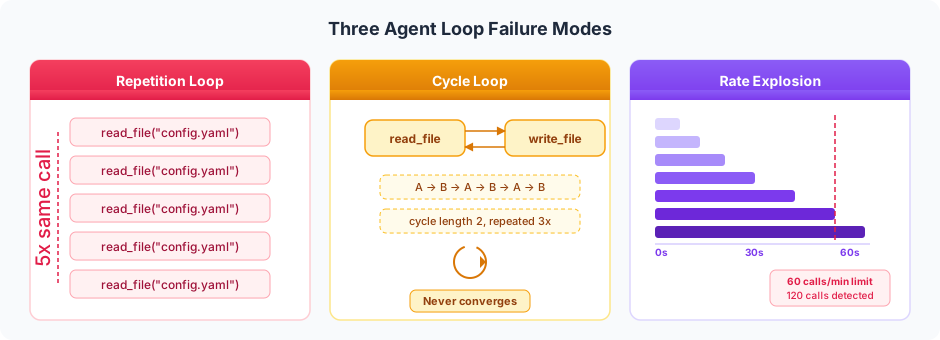
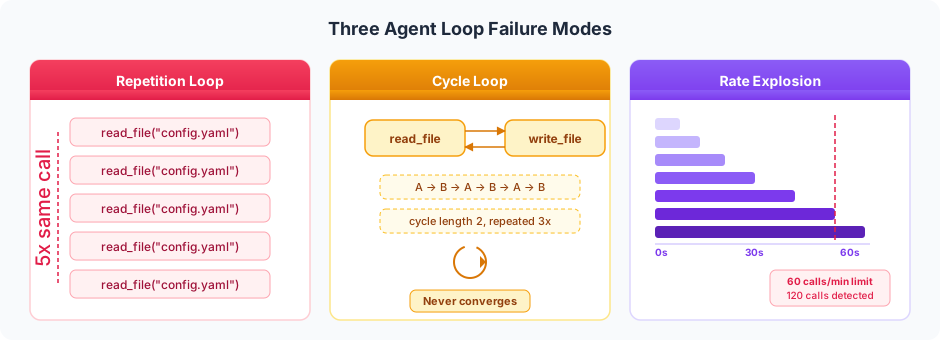
Three failure modes emerge:
- Repetition loops — The agent calls the same tool with the same arguments repeatedly. A claims processing agent re-querying the same policy document five times in a row because it can't parse the response.
- Cycle loops — The agent bounces between tools in a predictable pattern without making progress. A research agent stuck in a lookup → summarize → lookup → summarize cycle because each summary reveals a new question, which triggers a new lookup, which triggers a new summary.
- Rate explosions — The agent fires tool calls at an unsustainable rate. An inventory agent checking stock levels across 500 SKUs in parallel, overwhelming your warehouse API with 120 calls in under a minute.
None of these are visible at the HTTP layer. A traditional API gateway sees valid POST requests and proxies them faithfully. The OWASP Top 10 for LLM Applications identifies unbounded agent operations as a key risk area. You need a governance layer that understands what the agent is doing over time, not just what a single request looks like.
Pattern 1: Loop Detection — Catching Agents Before They Spiral
Loop detection works by maintaining a per-session history of tool calls and scanning for pathological patterns in real time. The DVARA MCP Gateway runs this check on every tool call, before the request reaches the upstream tool server.
Three Detection Strategies
Repetition detection catches the simplest failure mode: the same tool called N times in a row. If an agent calls read_file on the same path five consecutive times, something is wrong. The threshold is configurable — some workflows legitimately poll a resource, so you might set it higher for those workspaces.
Cycle detection looks for repeating multi-step patterns. If the call history shows read_file → write_file → read_file → write_file → read_file → write_file, that's a cycle of length 2 repeated 3 times. DVARA checks cycle lengths from 2 up to 4 steps, requiring 3 repetitions before triggering. This catches agents stuck in plan-execute-evaluate loops that never converge.
Rate detection is a time-based safety net. Even if every call is different, 120 tool calls in 60 seconds from a single session is almost certainly a runaway agent. The default threshold is 60 calls per minute — high enough to avoid false positives on busy but healthy sessions.
Configuration
Loop detection is enabled globally by default. You can tune thresholds per workspace via metadata overrides:
# Global defaults in application.yml
dvara:
  mcp-gateway:
    agentic:
      loop-detection:
        enabled: true
        repetition-threshold: 5      # same tool N times in a row
        cycle-max-length: 4           # check patterns up to length 4
        cycle-repetitions: 3          # require 3 repeats to trigger
        max-calls-per-minute: 60      # rate-based safety net
        auto-kill: false              # kill session on detection (opt-in)
        history-size: 100             # per-session call buffer
For workspaces with specific needs, override via workspace metadata:
{
  "agentic.loop-detection.enabled": "true",
  "agentic.loop-detection.repetition-threshold": "10",
  "agentic.loop-detection.max-calls-per-minute": "120",
  "agentic.loop-detection.auto-kill": "true"
}
What Happens When a Loop Is Detected
When any pattern triggers, the MCP Gateway:
- Returns HTTP 429 with error code
AGENT_LOOP_DETECTEDand a message describing the loop type (repetition, cycle, or rate). - Writes an audit event with the session ID, tool name, loop type, and workspace ID.
- Dispatches a webhook so your alerting system (PagerDuty, Slack, OpsGenie) can notify the team.
- Optionally auto-kills the session (if
auto-killis enabled), blocking all future tool calls from that session ID.
The agent framework receives a clear 429 error and can decide how to handle it — back off, escalate to a human, or terminate the task. The critical point is that the damage stops at the proxy layer, before another tool call reaches your infrastructure.
Pattern 2: Session Kill Switch — The Emergency Stop Button
Loop detection is automated, but sometimes you need manual intervention. A human operator sees something wrong — an agent is accessing resources it shouldn't, generating unexpected costs, or behaving erratically in ways that don't match a simple loop pattern — and needs to stop it immediately.
The session kill switch provides exactly this. Every agent session flowing through the DVARA MCP Gateway is tracked by session ID, with real-time metrics: tool call count, error count, total latency, distinct servers and tools accessed, and timestamps.
How It Works
DVARA's session tracker maintains a per-session state with atomic counters. When an operator kills a session, the session ID is added to a killed-sessions set. Every subsequent tool call from that session is rejected with HTTP 403 (SESSION_KILLED) before the request reaches the tool server.
Kill it from the session's detail page in the Console — MCP → Sessions, open the session, then Kill session. The kill is recorded as an MCP_SESSION_KILLED audit event, and every subsequent tool call on that session id is refused immediately.
Find the session causing trouble in the Console, under MCP → Sessions (/mcp/sessions), filtered by workspace and to active sessions only. The list shows tool-call counts, duration and error rate per session; opening a row gives the full timeline.
Updated for 1.7.0. This post originally used a
GET /v1/admin/sessionscall here. That REST API was removed in 1.7.0 — the Console and the workspace Portal are the management surface now, and automation authenticates as a user with a personal access token against the surfaces that remain.
The response includes enough context to make a decision:
{
  "sessionId": "sess_abc123",
  "tenantId": "acme-corp",
  "toolCallCount": 247,
  "errorCount": 38,
  "totalLatencyMs": 89420,
  "distinctServers": ["crm-service", "stripe-payments", "refund-engine"],
  "distinctTools": ["get_customer", "query_payments", "check_policy", "issue_refund"],
  "firstSeen": "2026-03-28T22:14:01Z",
  "lastSeen": "2026-03-30T07:48:33Z",
  "active": true
}
247 tool calls across three production services. 38 errors. Running since Friday night. That's the billing dispute agent from our earlier scenario — stuck in a retry loop over the weekend. A 15% error rate on a session that's been active for 33 hours tells you everything you need to know. One click to kill it.
The DVARA Flightdeck provides the same view with one-click kill buttons, and the timeline view shows the exact sequence of tool calls with color-coded status badges.
Auto-Kill From Loop Detection
The kill switch and loop detection work together. When auto-kill is enabled, a detected loop automatically kills the session — no human intervention required. This is the strongest enforcement mode: the agent's current call gets a 429, and every future call from that session gets a 403. The session is effectively terminated at the infrastructure layer, regardless of what the agent framework does.
Pattern 3: Human-in-the-Loop Approval Gates — Controlled Autonomy
Some tool calls are too consequential to let an agent execute autonomously, but too valuable to block entirely. Deleting a database record, sending an email to a customer, deploying a code change — these are operations where you want the agent to propose the action and a human to approve it.
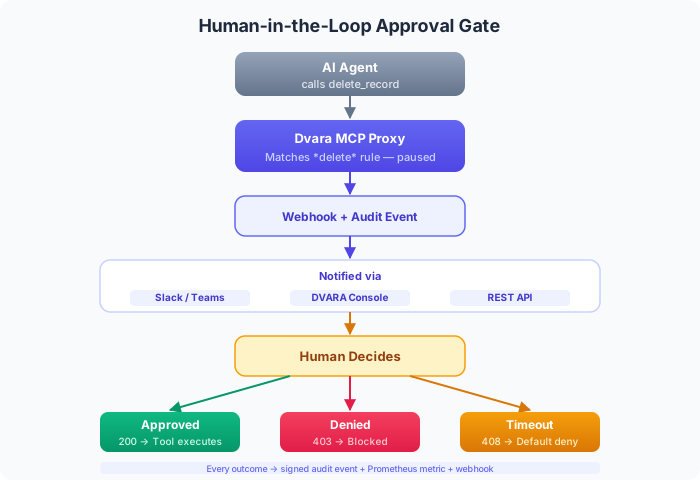
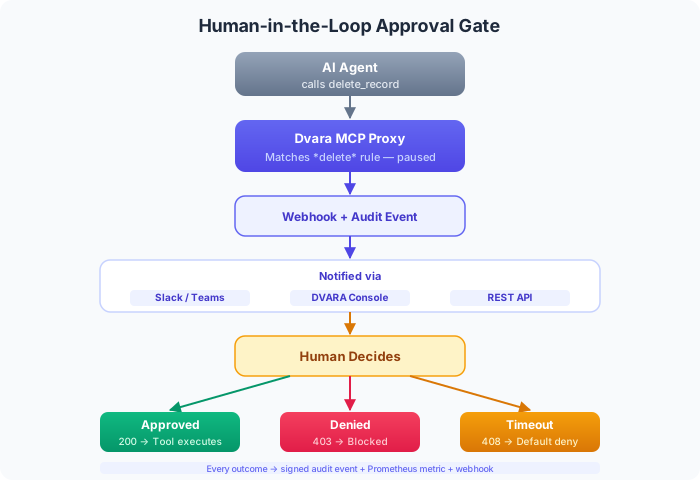
The DVARA approval gate pattern implements this as a blocking filter in the MCP Gateway. When a tool call matches a configured approval rule, the request is paused mid-flight while a human reviews and decides.
Configuring Approval Rules
Approval rules are configured per workspace using glob patterns for tool names and exact matches for server IDs:
{
  "approval.required-tools": "*delete*,*send_email*,deploy_*",
  "approval.required-servers": "production-db,email-service",
  "approval.timeout-seconds": "300",
  "approval.default-action": "deny"
}
Any tool call matching these patterns triggers the approval flow. The glob syntax supports * and ? wildcards — *delete* matches delete_record, bulk_delete, delete_user, and any other tool with "delete" in the name.
The Approval Flow
Here's what happens when an agent calls a tool that requires approval:
Agent calls "delete_record" on production-db
    ↓
MCP Gateway: Approval required (matches *delete* + production-db)
    ↓
Proxy writes audit event: MCP_APPROVAL_REQUESTED
    ↓
Proxy dispatches webhook with approve/deny action URLs
    ↓
Proxy holds the request until a decision arrives
    ↓
  ┌─── Human clicks "Approve" in Slack/DVARA Flightdeck/webhook URL ───┐
  │                                                              │
  ↓                                                              ↓
Request proceeds to tool server              ... or 5 min timeout
                                                      ↓
                                              Default action: deny
                                                      ↓
                                              HTTP 408 returned to agent
Approval Channels
Approvals can be resolved through three channels — pick whichever fits your team's workflow:
Updated for 1.7.0. This table previously listed a
POST /v1/admin/approvals/…REST call as the third channel. That API was removed in 1.7.0; the workspace Portal's own queue takes its place, and webhook action URLs remain the route for automation.
| Channel | How it works | Best for |
|---|---|---|
| Webhook action URLs | Payload includes HMAC-signed approve/deny URLs. Wire them into Slack buttons, Teams cards, or PagerDuty. No auth needed — the signed token is the credential. | Teams already living in Slack or Teams |
| Workspace Portal | The workspace's own approval queue at /portal/approvals, scoped to that workspace | A team resolving its own agents' requests without operator access |
| DVARA Flightdeck | Approval queue with full context and one-click approve/deny buttons. Badge counter in the nav shows pending count. | Ops teams monitoring a dashboard |
What If Nobody Responds?
If no human acts within the timeout window (default: 5 minutes), the proxy makes the call for you. The default is deny — fail closed, block the tool call. This is the safe default for destructive operations like deletes and payments.
For lower-risk tools where blocking hurts more than allowing, you can flip the default to approve — fail open after timeout, let the request through.
Either way, every outcome is recorded: who approved, who denied, how long the decision took, or that it timed out. Full audit trail, full metrics.
Architecture: Where Governance Lives in the Request Path
These three patterns are implemented as filters in the DVARA MCP Gateway. The filter chain processes every tool call in a fixed order, and each governance filter can short-circuit the request before it reaches the tool server.
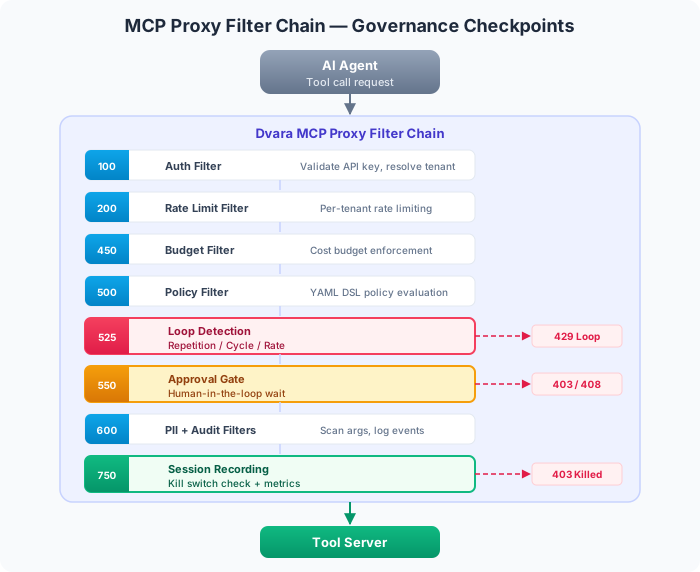
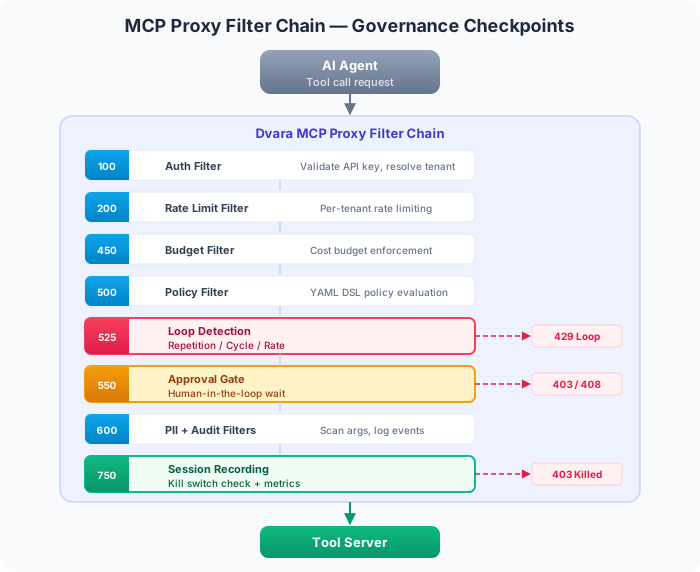
The ordering is intentional:
- Loop detection runs before the approval gate — there's no point asking a human to approve a tool call from a looping agent. Catch the loop first.
- The approval gate runs before PII scanning — if the request is denied, you don't need to spend compute scanning it.
- Session recording runs last — it checks the kill switch as a final safety net and records metrics for every request that makes it this far.
Each filter operates independently. You can enable loop detection without approval gates, or approval gates without loop detection. The MCP plane runs with or without a licence; workspace configuration decides which of its controls apply.
The Case for Infrastructure-Layer Governance
You could build loop detection into your agent code. You could add approval gates to your LangChain tool wrappers. But there are three reasons to push this to the infrastructure layer instead:
Consistency across frameworks. Your organization probably uses more than one agent framework. A governance rule in LangChain doesn't protect your CrewAI agents, your custom Python scripts, or the vendor agent platform you're evaluating. The DVARA MCP Gateway sits between all agents and all tools — one policy, universal enforcement.
Separation of concerns. Agent developers should focus on task logic, not governance plumbing. A security team should be able to change approval rules without redeploying agent code. Infrastructure-layer governance makes this possible — configuration changes propagate live without restarts.
Auditability. Governance actions are recorded as signed audit events with workspace ID, session ID, tool name, and timestamp. When an operator kills a session, the kill action is recorded as an MCP_SESSION_KILLED audit event; the subsequent per-call 403 rejections for that killed session are not individually audited. This audit trail is tamper-evident (HMAC-SHA256 hash chaining) and exportable to your SIEM. Try getting that from scattered try-catch blocks in agent code.
Getting Started
The DVARA MCP Gateway is part of the Enterprise platform and runs without a licence for non-production use. See the plans for production rights and support.
DVARA's agentic governance runs in the gateway process, between your agents and your tool servers. No changes to agent code required — just repoint the tool endpoint.
Updated for 1.7.0. This post originally described the MCP Proxy as a standalone process on port 8070. In 1.7.0 the MCP and A2A planes moved into the gateway, so there is no separate process and no port 8070 — repoint the tool endpoint at the gateway on
8080. Current documentation calls this component the DVARA MCP Gateway.
- Follow the Quickstart guide to get DVARA running locally in under 5 minutes.
- Register your MCP tool servers via the DVARA Flightdeck or admin API.
- Point your agents at the MCP Gateway instead of directly at tool servers.
- Governance is on by default — loop detection starts working immediately. Configure approval gates per workspace as needed.
For the full configuration reference — per-workspace overrides, webhook integration, session tracking, and more — see the Agentic AI Governance documentation.
New to DVARA? Start with Why an AI Gateway? to understand the broader picture of why LLM and agent traffic needs a purpose-built gateway.
DVARA is the AI governance platform for LLM and MCP traffic. Policy-as-Code, tamper-evident audit, PII redaction, agentic governance, and cost attribution in one control plane. Learn more at dvarahq.com.