How to Secure MCP Tool Calls

An agent can keep sensitive data out of a model prompt and still leak it in the next tool call. MCP arguments and responses are separate data paths, so they need their own policy, PII handling, and audit controls.
AI agents also call external tools via the Model Context Protocol (MCP). A customer support agent queries your CRM. A code assistant reads and writes files. A data analysis agent runs SQL against your production database. Every one of these tool calls carries arbitrary JSON arguments — and those arguments can contain customer SSNs, credit card numbers, medical record identifiers, or any other sensitive data the agent scraped from a prior step in its reasoning chain.
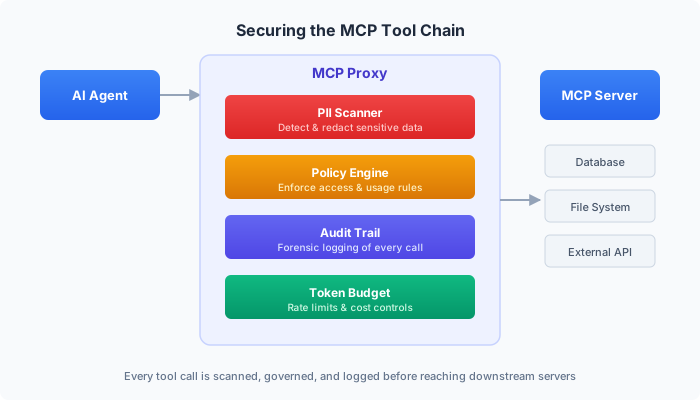
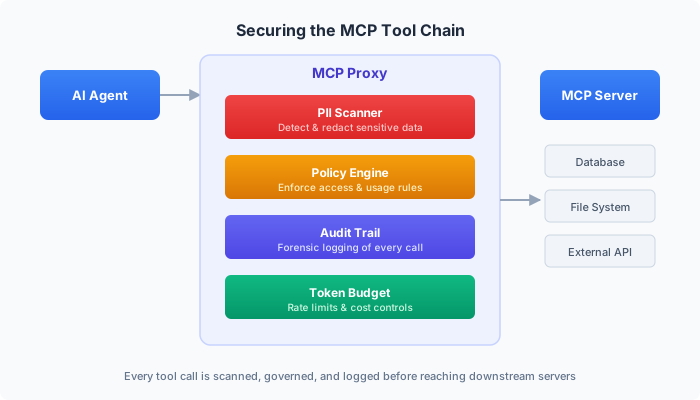
Without an enforcement point on the MCP path, the agent decides what to send and the tool server receives it. Nothing in between has to inspect, block, or record the call.
This post explains how the DVARA MCP Gateway applies three controls to tool calls: PII scanning, policy enforcement, and audit evidence.
Availability. The MCP Gateway is part of the Enterprise platform. It runs without a licence for non-production use; a licence grants production rights and support.
Updated for 1.8.2. This post originally said the MCP Gateway requires a valid licence to activate. In 1.8.2 every feature, the MCP and A2A planes included, runs without a licence for non-production use, within 3 workspaces and 100,000 governed calls a month. A licence removes both limits and gives production rights and support. An expired licence refuses no traffic.
Tool arguments are another data path
When an agent calls an LLM, the request goes through your AI gateway's guardrail pipeline — PII detection, injection scanning, content filtering. But when that same agent turns around and calls an MCP tool, the request typically bypasses every security control you've built.
Consider this scenario:
A claims processing agent is resolving a health insurance dispute. It pulls the claimant's record from your benefits API, including their SSN, date of birth, and diagnosis codes. The agent then calls a third-party medical coding tool to validate the ICD-10 codes — passing the patient's SSN and diagnosis in the tool arguments because that's what the LLM decided to include in the function call.
The medical coding tool did not need the SSN. Without a scanning layer between the agent and the tool server, protected health information has left your perimeter and created a compliance incident that may not be noticed until an audit.
This isn't a theoretical risk. The OWASP Top 10 for LLM Applications identifies sensitive information disclosure (LLM02) as a top vulnerability — and MCP tool arguments are a direct vector for it. It's the natural consequence of giving autonomous agents access to sensitive data sources and external tools without an inspection layer in between.
Layer 1: PII Scanning on Tool Arguments
The DVARA MCP Gateway scans every tool call's JSON arguments for PII entities before the request reaches the upstream tool server. The detection engine is the same one used for LLM prompt scanning — 15 built-in entity types with validation (Luhn checksum for credit cards, DEA checksum for prescriber numbers) plus custom regex patterns per workspace.
Three enforcement actions are available, configured per workspace:
BLOCK — Reject the request entirely
When a tool call argument contains PII and the workspace's policy is BLOCK, the MCP Gateway returns an error immediately. The request never reaches the tool server.
// Agent tries to call "validate_icd_codes" with PII in the arguments
{
  "tool_name": "validate_icd_codes",
  "arguments": {
    "patient_ssn": "123-45-6789",
    "diagnosis_codes": ["E11.9", "I10"],
    "claimant_name": "Jane Doe"
  }
}

// MCP Gateway response: 400
{
  "error": {
    "code": "mcp_pii_detected",
    "message": "PII detected in tool call arguments: SSN, PERSON_NAME. Request blocked by workspace policy.",
    "type": "mcp_error"
  }
}
The agent receives a clear error. Well-designed agent frameworks will interpret this as a signal to retry without the sensitive fields — or escalate to a human.
REDACT or TOKENIZE — remove or recover later
Both actions keep the original value away from the tool server. REDACT
replaces it permanently with a typed placeholder and stores nothing.
TOKENIZE replaces provider-bound arguments with a recoverable token and needs
the Enterprise token store and usable key material. The default action is
LOG, so choose either action explicitly.
// What the tool server can receive after TOKENIZE
{
  "tool_name": "validate_icd_codes",
  "arguments": {
    "patient_ssn": "{{PII_SSN_a1b2c3d4}}",
    "diagnosis_codes": ["E11.9", "I10"],
    "claimant_name": "{{PII_PERSON_NAME_d4e5f6a7}}"
  }
}
Authorized operators can detokenize TOKENIZE output in DVARA Flightdeck. A
redacted value cannot be recovered. Newly detected response PII is also removed
irreversibly under both actions; DVARA does not mint a recovery token for tool
output.
LOG — Allow but record
LOG lets the request through unchanged but creates an audit event for compliance review. This is the least disruptive mode — useful during initial rollout when you want to understand what PII flows through tool calls before deciding whether to block or redact.
PII Scanning on Tool Responses
The scanning is not one-directional. When a tool server responds — say, a database query returning customer records — the MCP Gateway scans the response body for PII output leaks. If a database tool returns 50 customer emails, the Gateway detects this and writes an MCP_PII_OUTPUT_LEAK audit event, regardless of whether the request-side scan found anything.
This catches a class of problems that request-side scanning can't: the tool call arguments were clean (just a SQL query string), but the result contains sensitive data that the agent will incorporate into its next LLM call.
Layer 2: Policy Enforcement — Server and Tool Access Control
PII scanning catches sensitive data. Policy enforcement controls which tools agents can call at all.
DVARA's policy engine evaluates every MCP request against YAML DSL rules before the request reaches the tool server. Policies support server-level and tool-level access control with allowlists and denylists.
Denying specific tools
A policy that prevents any agent from calling destructive database operations on a production server:
version: 1
rules:
  - id: block-destructive-db-ops
    priority: 10
    conditions:
      mcp_server:
        denylist:
          - production-db
      mcp_tool:
        denylist:
          - drop_table
          - delete_records
          - truncate_table
    action: DENY
    deny_message: "Destructive database operations are not allowed on production servers. Use the staging environment."
Restricting servers per workspace
A cost-sensitive workspace should only access approved tool servers, not the entire fleet:
version: 1
rules:
  - id: restrict-workspace-servers
    priority: 20
    conditions:
      mcp_server:
        allowlist:
          - internal-search
          - knowledge-base
    action: DENY
    deny_message: "This workspace is restricted to approved tool servers only."
When a policy denies an MCP request, the proxy returns HTTP 403 with error code MCP_POLICY_DENIED, writes an audit event with the policy ID and rule ID, and the agent receives a clear explanation of why the call was blocked.
Budget-Aware Policy Warnings
Policies can also issue non-blocking warnings. A WARN_AGENT rule tied to budget utilization can alert an agent that it's approaching its spending limit — without blocking the request:
version: 1
rules:
  - id: warn-high-spend
    priority: 50
    conditions:
      budget_utilization:
        threshold_pct: 75
    action: WARN_AGENT
    warn_message: "Budget utilization above 75%. Consider reducing tool call frequency."
The warning is attached to the response as a header, giving the agent framework a signal to throttle without a hard stop.
Layer 3: Forensic Audit Trail — What Did the Agent Do?
Every MCP tool call that passes through DVARA's proxy generates a pair of audit events that together create a forensic record of the agent's actions.
Pre-request: MCP_TOOL_INTENT
Before the request is forwarded, the proxy writes an intent event:
{
  "eventType": "MCP_TOOL_INTENT",
  "tenantId": "acme-corp",
  "payload": {
    "server_id": "production-db",
    "operation": "tools/call",
    "tool_name": "query_customers",
    "trace_id": "tr_8f3a2b1c",
    "session_id": "sess_abc123",
    "user_id": "agent-pipeline-7",
    "policy_decision": "ALLOW",
    "pii_action": "TOKENIZE",
    "pii_in_args": true,
    "args_hash": "sha256:e3b0c44298fc1c149afbf4c8996fb924..."
  }
}
The args_hash is a SHA-256 digest of the canonical JSON arguments — a tamper-evident fingerprint of exactly what the agent tried to send, without storing the raw arguments (which may contain sensitive data). Only TOKENIZE creates a recoverable mapping; REDACT deliberately leaves none.
Post-response: MCP_TOOL_RESULT
After the tool server responds, the proxy writes a result event:
{
  "eventType": "MCP_TOOL_RESULT",
  "tenantId": "acme-corp",
  "payload": {
    "server_id": "production-db",
    "tool_name": "query_customers",
    "trace_id": "tr_8f3a2b1c",
    "session_id": "sess_abc123",
    "http_status": 200,
    "latency_ms": 142,
    "response_bytes": 3847,
    "is_error": false,
    "pii_in_response": true,
    "policy_decision": "ALLOW",
    "pii_action": "TOKENIZE"
  }
}
Correlating events across a session
The trace_id ties the intent and result events for a single tool call together. The session_id ties all tool calls from the same agent session together. This gives you two levels of analysis:
- Single call forensics: "What arguments did the agent send to
query_customersat 14:32, and what came back?" — filter bytrace_id. - Session reconstruction: "Show me everything agent session
sess_abc123did from start to finish — every tool it called, every server it touched, every PII detection, every policy decision." — filter bysession_id.
The session timeline view
The DVARA Flightdeck surfaces this as a session timeline — a chronological view of every tool call in a session with color-coded badges:
- Green — successful tool call, no PII, no policy issues
- Yellow — PII detected (logged or redacted), or policy warning issued
- Red — PII blocked, policy denied, or error from tool server
An operator can click into any event to see the full audit payload, including which PII entities were detected, which policy rule matched, and the response latency. For sessions with hundreds of tool calls, this is the difference between investigating for hours and understanding the problem in minutes.
Every audit event is persisted with HMAC-SHA256 hash chaining — each event's signature includes the hash of the previous event, creating a tamper-evident chain. If anyone modifies or deletes an audit record, the chain breaks and the integrity verification fails. This is the same tamper-evident AI audit log that backs DVARA's SOC 2 / HIPAA / GDPR reporting across LLM, MCP, and agent-to-agent calls.
The Compliance Argument
An MCP call that carries personal data is part of the data flow a GDPR review needs to account for. When a covered organization uses tool calls to handle protected health information, its access-control and audit obligations still apply to that path.
Building this compliance into each agent's codebase is impractical. You'd need every framework, every team, every third-party agent platform to implement the same scanning, policy checks, and audit logging — consistently, correctly, and verifiably.
A gateway enforcement point gives every tool call the same controls, regardless of which framework or team produced it. That leaves one place to set policy and one evidence trail to review.
Getting Started
The DVARA MCP Gateway is part of the Enterprise platform and runs without a licence for non-production use. See the plans for production rights and support.
DVARA's MCP Gateway controls use safe, observable defaults:
- Follow the Quickstart guide to get DVARA running locally.
- Register your MCP tool servers via the admin API or DVARA Flightdeck.
- PII scanning is enabled by default in LOG mode — start monitoring what flows through your tool chain before tightening enforcement.
- Add policies when you're ready to restrict tool and server access per workspace.
- Review the session timeline in the DVARA Flightdeck to see your agents' full tool call history with PII and policy annotations.
For the full configuration reference — per-workspace PII actions, custom regex patterns, policy YAML DSL, and audit export — see the PII Detection documentation and Agentic AI Governance documentation.
Key Takeaways
- AI agents call external tools via MCP — and those tool calls are an ungoverned data exfiltration path. An agent can leak a customer's SSN in a tool argument without anyone inspecting, blocking, or recording what happened.
- PII scanning at the gateway layer catches sensitive data in both directions. Scan tool arguments before they leave your perimeter (
LOG,BLOCK, irreversibleREDACT, or reversible request-sideTOKENIZE), and scan tool responses for PII output leaks on the way back. - Policy enforcement controls which tools agents can call at all. YAML DSL rules enforce server and tool allowlists/denylists per workspace — no code changes, no agent redeployment.
- Every tool call generates a forensic audit trail. Pre-request intent events and post-response result events, correlated by trace ID and session ID, with HMAC-SHA256 hash chaining for tamper evidence.
- Gateway enforcement gives teams one control point. One path can cover different agent frameworks, teams, and tool servers consistently.
- Tool calls belong in the compliance review. If they process personal or protected data, include them in the same access-control and evidence model as the rest of the application.
DVARA is the AI governance platform for LLM and MCP traffic. Policy-as-Code, tamper-evident audit, PII redaction, agentic governance, and cost attribution in one control plane. Learn more at dvarahq.com.