GitOps: Config Export / Import
Not included in DVARA Open Source.
DVARA lets you snapshot and replay the entire gateway configuration — workspaces, routes, policies, pricing, budgets, webhooks, MCP servers, users, schemas, and prompt templates. Open user menu → Import / Export in DVARA Flightdeck as an owner. This is the supported bulk-configuration workflow; the former Automation API was removed in 1.7.0. From 1.10.0 a pipeline can run the same import with a personal access token: see Import from a pipeline.
Export
Returns a JSON snapshot of all workspaces, routes, policies, pricing, budgets, webhooks, MCP servers, virtual MCP servers, users, schemas, and prompt templates. Sensitive fields (webhook secrets and MCP or A2A credential references) are redacted to "***" only when a value exists; an empty reference stays empty. Other connection settings remain in the export. The response includes a warnings list flagging anything that was omitted or masked.
Open user menu → Import / Export and use the export form to pick a workspace scope (or leave it blank for the whole fleet):
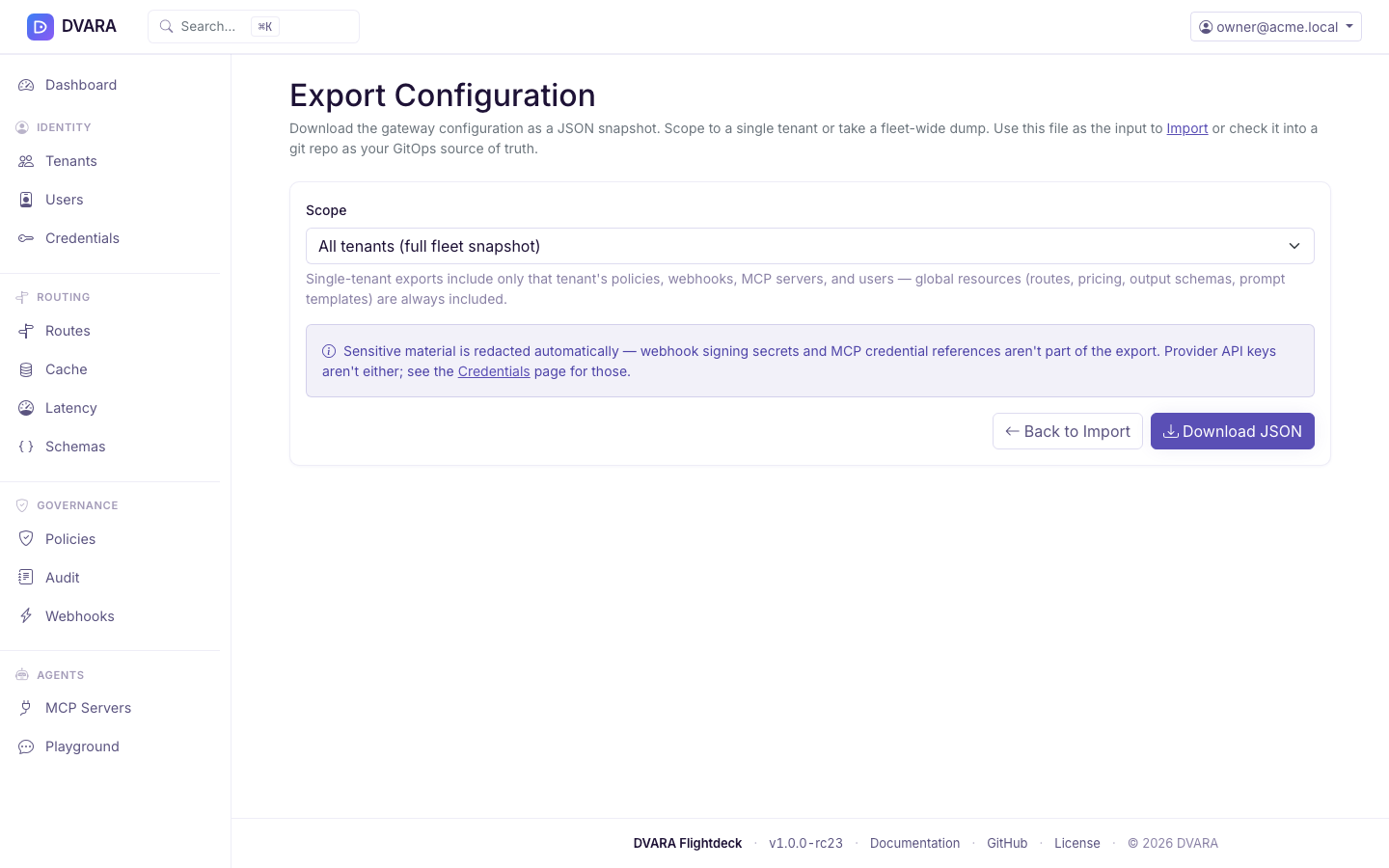
Exports run in parallel across every entity type, so a snapshot is fast even for large deployments.
A workspace-scoped export records scope_workspace_id and contains that
workspace's configuration, including its budget caps and prompt templates.
Routes, model pricing, and output schemas remain platform-wide and are not part
of the workspace scope.
Import
The import operations are POST /config/import/preview and POST /config/import/apply. Preview validates the uploaded content and returns the staged change set with a SHA-256 contentHash. Apply must echo that exact hash; Flightdeck refuses changed or stale content that was not reviewed.
Applies a configuration file, uploaded or pasted into the import form.
| Mode | Behavior |
|---|---|
merge (default) | Upsert entities; never delete anything missing from the file |
replace | Full sync for an unscoped export: upsert and delete entities not present in the file. A scoped export is refused in this mode; use merge. The signed-in account is always kept. |
Choose Preview to inspect every proposed create, update, and delete before anything is written.
Import is atomic: every entity type is written in a single transaction, and a failure at any point rolls back every prior change in the same request — you never end up with half-applied config. Invitation emails are sent only after a successful commit. On a non-dry-run import, a CONFIG_IMPORTED audit event is written with the actor, mode, counts, and the full change list.
For an existing MCP server or A2A agent, an imported "***" keeps the stored
credential reference. For a new server or agent it fails preview because there
is no stored value to keep; replace the mask with the real reference before
restoring to a fresh install. Files exported before 1.8 can also omit newer
connection settings, so take a new export before a round trip.
A workspace's MCP server or A2A agent can only name a credential that the same
workspace owns, as on the MCP server and A2A agent pages. Preview lists each
server or agent whose credential reference names another workspace's
credential, an install-wide name, or a credential that does not exist, and
apply refuses the whole file. This covers a "***" that would carry a stored
reference into another workspace. A server or agent with no workspace can
name any credential.
From 1.9.0, an import also reads each A2A agent's Agent Card, as the agent
pages do. Preview lists each agent whose card offers no binding DVARA supports
(DVARA does not support gRPC), and apply refuses the whole file. To import such
an agent anyway, set "bindingOverride": true on it in the file; the import is
then recorded in the audit log. An export carries the setting. An agent whose
card cannot be read is imported as before.
From 1.10.0 an export carries two more things for each A2A agent:
- Where it came from. An agent registered from the A2A catalog keeps its
recorded origin (
provenance: the source, catalog entry id, external id, version and when it was recorded), and an import into another install keeps it. The origin is a record, not a trust signal: the catalog entry it names need not exist in the other install, and it changes nothing about how the card is checked. A file without it imports a new agent with no origin; an agent already stored keeps its own. - Its Agent Card address (
cardUrl), when one was given by hand. An import naming a card on a host other than the agent's endpoint is refused whole.
The Flightdeck UI version of the same flow lives at user menu → Import / Export → Import. Upload a JSON file or paste it, pick merge / replace, and click Preview. The preview stages the diff on your session (a SHA-256 contentHash ride-along prevents DevTools tampering between preview and apply), then Apply commits in one transaction:
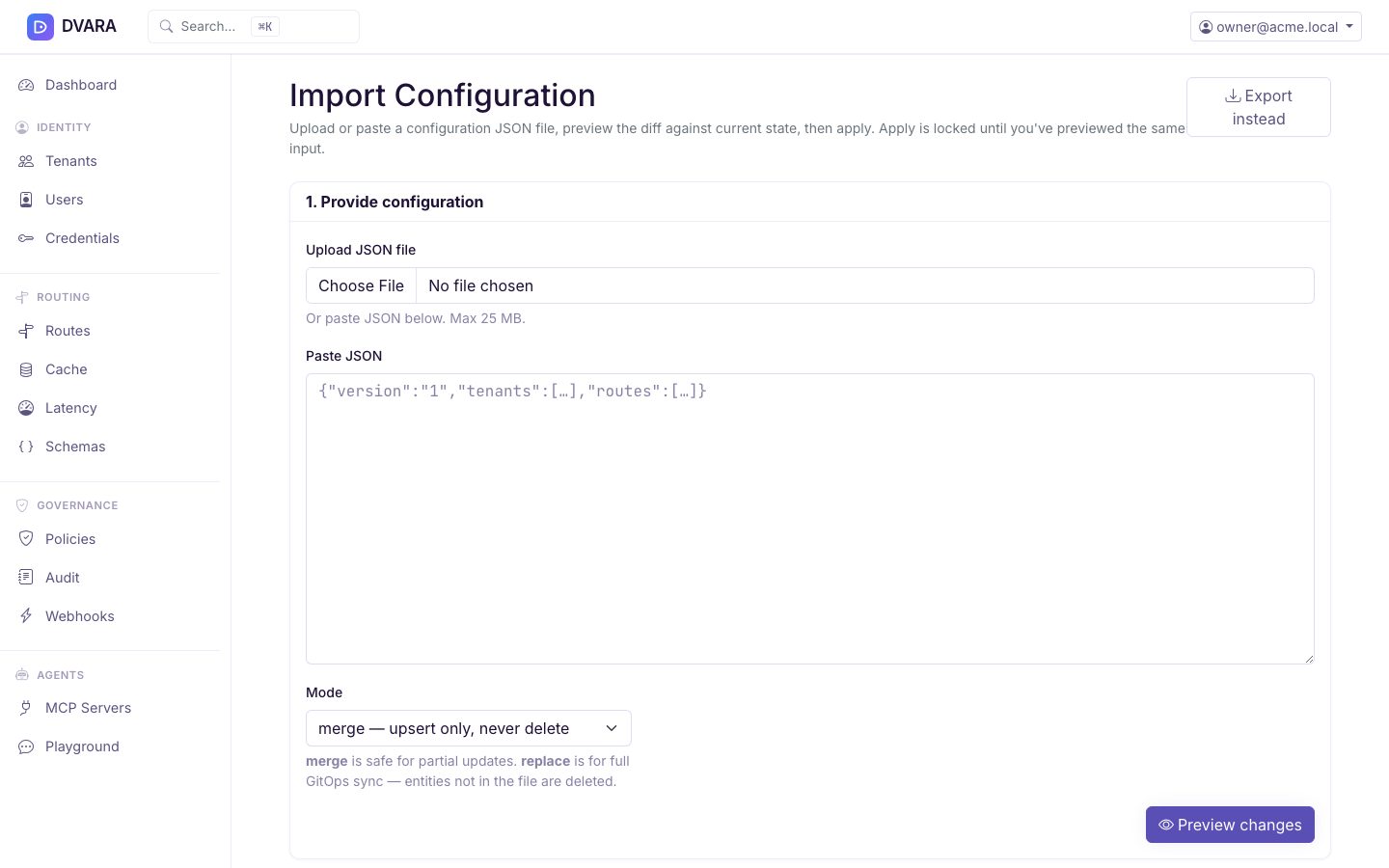
Virtual MCP servers
From 1.9.0 an export carries virtual_mcp_servers: each one's name, workspace,
member servers and tools. A workspace export carries only that workspace's.
Earlier exports left them out, so a round trip lost them.
An import checks them as Flightdeck does: a valid name not used by another virtual server of the workspace, at least one tool, and every tool on a member. A failed check refuses the whole file. A member server the install does not have is only a warning, and the virtual server is imported as incomplete.
Accounts, teams and team members
From 1.8.3 an export also carries accounts, teams and team_members (each a user_id and a team_id). A full export carries all of them; an export of one workspace carries its team, that team's account, and the memberships of the people in the file.
On import, accounts and teams are saved before the workspaces and people that name them. The preview refuses the file when a team names an account, or a membership names a team or person, that is neither in the file nor on the install, so an import never brings in a team that does not exist. New accounts and teams meet the licence limit for the whole file. REPLACE never deletes an account or a team.
Import validates before it writes
Preview parses and validates the file and stages a diff; nothing is written until you apply. Earlier releases wrote through the repositories and checked very little, so a malformed file could be applied part-way.
This matters because import is the only supported bulk-configuration path. A file that fails validation is rejected whole, with the reason, rather than leaving the fleet half-configured.
Two collision cases are refused at preview rather than at apply time, because neither has a safe automatic answer: two rows in one file sharing an email address, and a row whose id exists but whose address now belongs to a different account.
From 1.8.4 the import keeps one route per model pattern, matching Flightdeck's route form.
Preview and apply refuse a file that gives one pattern two routes. In merge
mode they also refuse a route that takes a pattern a stored route keeps, and
name that stored route. In replace mode the file is compared with itself,
because every stored route it does not list is deleted. The apply checks the
rule at commit, so one file can move a pattern from one route to another.
API-key agent bindings ("Acts as agent"). From 1.8.4 an export leaves out a
binding whose API key has been deleted, and marks a binding whose agent is
deleted or not active with "stale": true. The import skips a stale binding and
lists it under Skipped in the result instead of refusing the file. Before
1.8.4 an export that held such a binding could not be imported again. Deleting
an API key now deletes its binding too, and the 1.8.4 upgrade removes bindings
that deleted keys had left behind.
From 1.8.5 a binding can carry mayStartChains: true, for a key whose agent may
start a delegation chain of its own (see the
hardened preset).
An export leaves the field out when it is false. The import also refuses an
active A2A agent whose endpoint is not https://, with A2A_ENDPOINT_NOT_HTTPS.
Preview also compiles every policy definition. A malformed policy names the
policy and fails the preview before any row is written or invitation is sent.
In full replace mode, dropping a workspace deletes its workspace-scoped data
through the same cascade as deletion in Flightdeck while retaining audit chains and
MCP tool-call evidence.
Workflow example
- Export — open Import / Export in Flightdeck, pick the scope (whole fleet, or one workspace), and download
gateway-config.json. - Edit and commit — change the file and put it through your normal review process. It is a single JSON document, so it diffs cleanly in a pull request.
- Preview — back in Flightdeck, upload or paste the edited document. The preview is a dry run: it groups the changes per entity type and shows you exactly what would be created, updated or left alone. Nothing is written yet.
- Apply — confirm the staged diff. The apply is one transaction: it all lands or none of it does.
Import from a pipeline
From 1.10.0 a pipeline can preview and apply a file with one HTTP call to Flightdeck. It runs the same import as the page, so every check, refusal and audit event is the same. Up to 1.9.x the apply step had to be done by a person on the page.
# Preview (the default). Nothing is written.
curl -sS --fail-with-body -X POST \
  "$FLIGHTDECK_URL/v1/admin/config/import?mode=merge" \
  -H "Authorization: Bearer $DVARA_PAT" \
  -H "Content-Type: application/json" \
  --data-binary @gateway-config.json

# Apply
curl -sS --fail-with-body -X POST \
  "$FLIGHTDECK_URL/v1/admin/config/import?mode=merge&dryRun=false" \
  -H "Authorization: Bearer $DVARA_PAT" \
  -H "Content-Type: application/json" \
  --data-binary @gateway-config.json
A common pattern is to preview on each pull request and apply when it merges.
--fail-with-body makes the job fail when the file is refused, and still prints
the reasons.
| Parameter | Default | Effect |
|---|---|---|
mode | merge | merge or replace, as on the page |
dryRun | true | true previews; false applies |
Only an owner's personal access token is accepted. Create the token in
user menu → Access Tokens while signed in as an owner; its scopes come
from your roles. A browser session or an OIDC sign-in token gets 403, because
this route has no CSRF protection and is meant for a bearer token. A token
whose user is not an owner also gets 403.
| Status | Meaning |
|---|---|
200 | The preview or the applied result: counts of created, updated, deleted and unchanged entities, the change list, and warnings |
400 | The body is not valid JSON, or mode is unknown |
401 | No credential was sent |
403 | The caller is not an owner's personal access token |
413 | The body is over 25 MB, the page's limit |
422 | The file was refused; errors gives the reasons and nothing changed |
A budget-cap change that needs a second approver cannot be requested from a pipeline, because asking needs a recent sign-in and a token is not one. The import refuses that file and changes nothing; a person imports it on the page.
CONFIG_IMPORTED and CONFIG_IMPORT_REJECTED record how the caller signed in
(via), so the audit log tells a pipeline (personal_access_token) from a
person.