Credentials & BYOK
Not included in DVARA Open Source.
DVARA lets each workspace bring their own provider keys (BYOK) instead of forcing a single platform-wide credential. Keys are encrypted at rest with AES-256-GCM, resolved per-request through a layered fallback chain, and can be rotated or revoked without a restart.
This page covers:
- The credential resolution chain — how DVARA decides which key to use for a given request
- Managing credentials through the DVARA Flightdeck
- Storage modes — Encrypted (default) vs zero-trust Reference
- Vault backends (HashiCorp, AWS Secrets Manager, Azure Key Vault)
- Rotation and revocation
The credential resolution chain
Every outbound provider call walks a four-step chain, and the first step that returns a key wins:
1. Workspace credential        (stored in DVARA, scoped to this workspace)
   ├─ ACTIVE row                → primary
   │    ├─ ENCRYPTED mode       → AES-256-GCM decrypted in-process
   │    └─ REFERENCE mode       → vault lookup via the secret_reference pointer
   └─ unexpired GRACE row       → fallback when no ACTIVE exists (same branching)
          ↓ miss
2. Platform-default credential  (stored in DVARA, no workspace scope)
   ├─ ACTIVE row  → ENCRYPTED decrypt or REFERENCE vault lookup
   └─ unexpired GRACE row → fallback when no ACTIVE exists
          ↓ miss
3. Vault (direct)           (HashiCorp, AWS Secrets Manager, or Azure Key Vault)
          ↓ miss
4. Environment variable     (OPENAI_API_KEY, ANTHROPIC_API_KEY, etc.)
The workspace is resolved from the API key before this chain runs, so every lookup is keyed by both the provider name and the workspace. Cross-workspace credential leakage is impossible by construction — one workspace's cached key cannot be served to another workspace, even under heavy concurrency.
The GRACE fallback only activates when no ACTIVE row exists for the slot — typically because the current ACTIVE credential was manually revoked. During normal operation, an ACTIVE credential is always preferred. If a workspace credential row exists but cannot be decrypted, its vault reference cannot be resolved, or the credential store cannot be read, DVARA stops the request with HTTP 503 workspace_credential_unavailable. It emits PROVIDER_CREDENTIAL_UNAVAILABLE and does not try the platform credential, direct vault, or environment. The failed value is not cached. Only a workspace with no credential row continues to step 2.
Why BYOK matters:
- Each workspace pays for their own usage directly to the provider
- Compliance — a workspace's traffic stays within their provider account
- Rotations are scoped to one workspace instead of the whole fleet
Require workspace-scoped credentials
By default, the chain falls through. A workspace without their own credential silently borrows the platform-default in step 2. For shared multi-tenant deployments, that's usually wrong — provider billing, rate limits, and key blast radius all collapse onto one upstream key.
Set the environment variable DVARA_CREDENTIALS_REQUIRE_TENANT_CREDENTIAL=true (or YAML property dvara.credentials.require-workspace-credential: true) to short-circuit the chain at step 1. A workspace with no own active credential receives HTTP 403 workspace_credential_required instead of borrowing the platform-default. Each rejection emits a PROVIDER_CREDENTIAL_MISSING audit event with the workspace id and the configuration key that was missing — useful for spotting workspaces that need to onboard their keys before traffic ramps.
For tiered SaaS where free-tier workspaces are allowed to share the platform-default and paid-tier workspaces must BYOK, set a per-workspace override in the workspace's metadata:
{
  "metadata": {
    "credentials.require-workspace-credential": false
  }
}
The override accepts a boolean, a number (0 / 1), or a YAML 1.1 truthy / falsy string (yes / no, on / off, 1 / 0, case-insensitive). Unrecognized values fall back to the global property and log a startup warning, so a typo doesn't quietly disable enforcement.
Two notes for operators:
- The request already has a workspace identity. Every
/v1request requires a workspace API key before strict-BYOK evaluates the workspace credential. - Rejection runs late. The gate fires inside the outbound provider call, after policy / budget / rate-limit filters have already evaluated. A misconfigured workspace still consumes their rate-limit window and budget for each rejected call, so size those defaults with onboarding headroom.
The four-step chain otherwise stays exactly as documented above — strict-BYOK only changes what happens when step 1 misses.
Managing credentials
Open Identity → Credentials in the sidebar. DVARA_ENCRYPTION_MASTER_PASSWORD is required for ENCRYPTED credentials (see Setup & Login) but is not needed for REFERENCE credentials — the zero-trust path never encrypts anything in-process.
Which providers can use a stored credential?
The credential form covers every provider that needs a key. Choose the provider; DVARA selects the matching credential field automatically.
| Provider | Credential stored by Flightdeck | Upstream authentication | Deployment setting that registers the provider |
|---|---|---|---|
| OpenAI | API key | Bearer token | OPENAI_API_KEY |
| Anthropic | API key | x-api-key header | ANTHROPIC_API_KEY |
| Google Gemini | API key | key query parameter | GEMINI_API_KEY |
| Azure OpenAI | API key | api-key header | AZURE_OPENAI_API_KEY and AZURE_OPENAI_BASE_URL |
| Mistral | API key | Bearer token | MISTRAL_API_KEY |
| Cohere | API key | Bearer token | COHERE_API_KEY |
| Groq | API key | Bearer token | GROQ_API_KEY |
| Qwen | API key | Bearer token | QWEN_API_KEY |
| DeepSeek | API key | Bearer token | DEEPSEEK_API_KEY |
| Moonshot | API key | Bearer token | MOONSHOT_API_KEY |
| ChatGLM | API key | Bearer token | ZHIPU_API_KEY |
| Grok | API key | Bearer token | XAI_API_KEY |
| AWS Bedrock | One Access Key ID credential and one Secret Access Key credential | AWS SigV4 | BEDROCK_ENABLED=true; AWS_REGION defaults to us-east-1 |
Provider registration happens at startup. Saving a workspace credential does not
register a provider that was absent when DVARA started. For an API-key provider,
set its deployment variable to a non-empty platform credential and restart
DVARA; workspace credentials then override that platform value per request. AWS
Bedrock registers from BEDROCK_ENABLED=true, but each request still requires
both stored AWS credentials or both environment values.
Ollama and the Mock test provider do not appear in the credential form because
neither needs a secret. Configure their enable flags and endpoints as deployment
settings. For Azure OpenAI, Flightdeck stores the API key only; configure the
resource base URL with AZURE_OPENAI_BASE_URL before startup.
Credential list
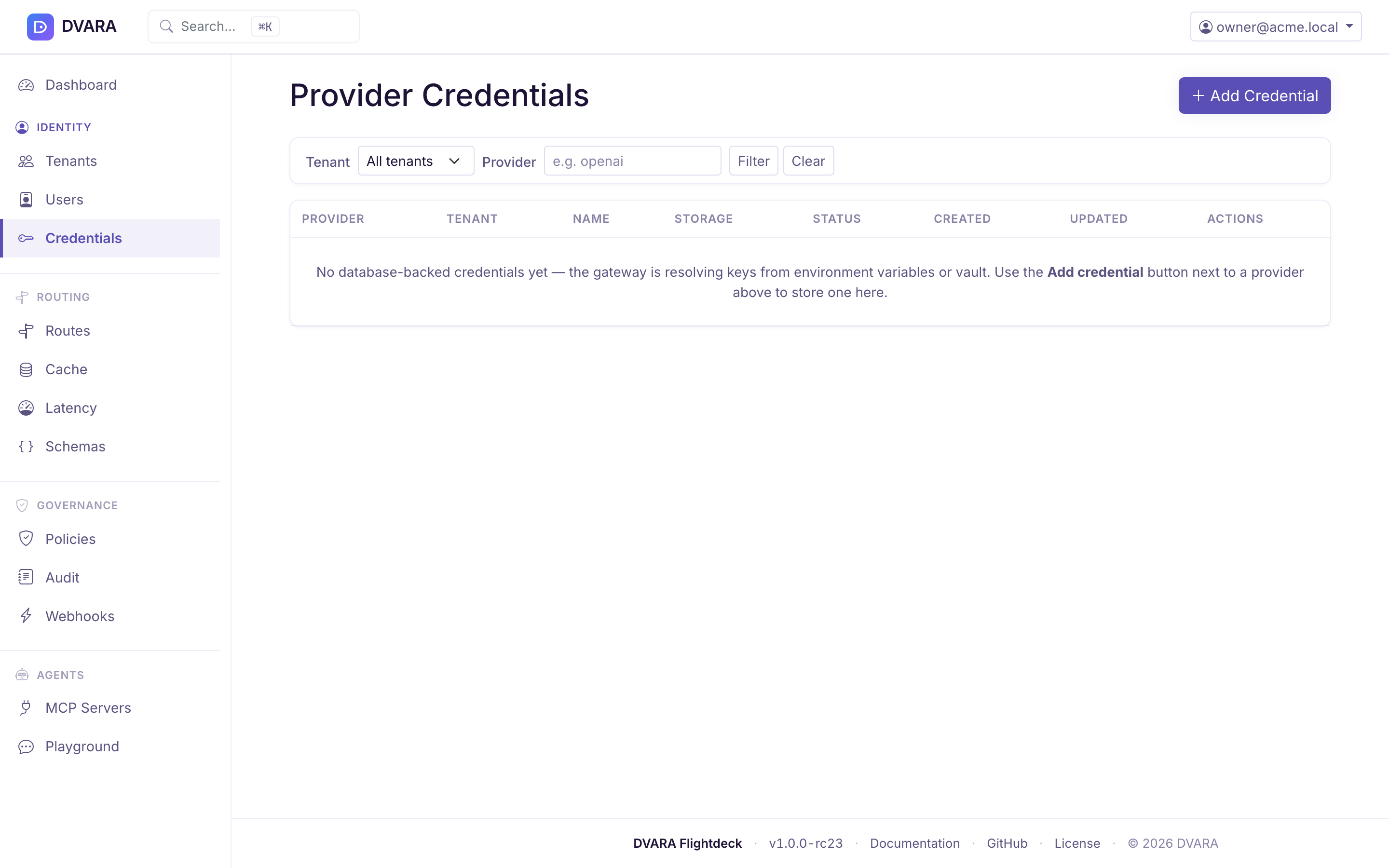
Lists every stored credential with name, provider, workspace (or platform default), status badge, last rotated, and actions. Key values are masked — only the first 8 characters of the encrypted prefix are shown. Filter by provider or workspace.
A credential is always in one of four statuses:
| Status | What it means | UI treatment |
|---|---|---|
ACTIVE | The current credential for this slot — resolved on every request | Green badge, Rotate/Revoke/Delete actions enabled |
GRACE | A rotated-away credential that is still usable as a fallback for a configurable window. The resolver serves it only when the current ACTIVE credential is missing (typically because you just revoked a bad rotation). | Amber badge with until HH:MM:SS UTC countdown, actions disabled |
SUPERSEDED | Replaced by a newer credential through rotation. Kept as lineage history so you can trace a rotation chain. Never resolved at request time. | Grey badge, Rotate/Revoke disabled (the successor is the one that rotates) |
REVOKED | Manually revoked by an admin. Skipped by workspace resolution. If no other usable workspace row exists, the workspace is treated as having no credential and normal fallback rules apply. | Red badge, no Rotate/Revoke (already terminal) |
DVARA guarantees at most one ACTIVE credential per (workspace, provider, secret key) slot at the database level, and at most one unexpired GRACE credential per slot as well. Two concurrent create attempts for the same ACTIVE slot cannot both succeed — the second gets a unique-constraint error. Rotating the same slot twice within a grace window collapses the earlier GRACE row to SUPERSEDED so only the most recent rotation's old key remains as a fallback.
Test and monitor a credential
Test a provider credential before you rely on it for governed traffic. On the create form, Test before saving checks the value currently in the form but does not store the credential or a health-history row. For a stored credential, click Test in the inventory. DVARA evicts its cached value, resolves the current secret, makes a safe provider-specific probe, and records the result.
The inventory shows the latest state as HEALTHY, INVALID, UNREACHABLE, or
INCONCLUSIVE, with the check time. Open Health history for the most recent
50 checks, including the HTTP outcome when the provider returned one, latency,
a safe message, check time, and the person who ran it. Secret values and
provider response bodies are never stored in this history.
A stored-credential test records audit evidence with the credential ID, provider, status, latency, and actor. A draft test is not audited because no managed credential exists yet. A healthy probe confirms that the key worked for the probe; it does not guarantee every model, region, quota, or provider permission.
Storage modes
Every credential is stored in one of two modes, chosen at creation time:
| Mode | Where the secret lives | When to pick it |
|---|---|---|
ENCRYPTED (default) | In the DVARA database as AES-256-GCM ciphertext. Decrypted in-process on every cache-miss request. | Simplest to operate — one master password, no external dependencies. Fine for most teams. |
REFERENCE | Not in DVARA. The database row holds only a pointer (vault path, AWS Secrets Manager ARN, Azure Key Vault secret name). DVARA resolves the live value through the configured vault backend per request. | Zero-trust posture: DVARA never holds the secret at rest. Even an attacker with full database access plus the master password gets nothing — they'd still need your vault. Required by many regulated enterprises. |
DVARA guarantees at the database level that every row carries either ciphertext or a pointer, never both and never neither. The check constraint rejects any inconsistent insert.
REFERENCE mode prerequisites:
- At least one vault backend must be configured:
dvara.vault.backend=hashicorp | aws-secrets-manager | azure-key-vault(see Vault backends below). - The vault must already contain the secret at the path / ARN / name you supply as the
secret_reference. DVARA_ENCRYPTION_MASTER_PASSWORDis not needed for REFERENCE credentials. A REFERENCE-only deployment can omit it entirely.
Create a credential
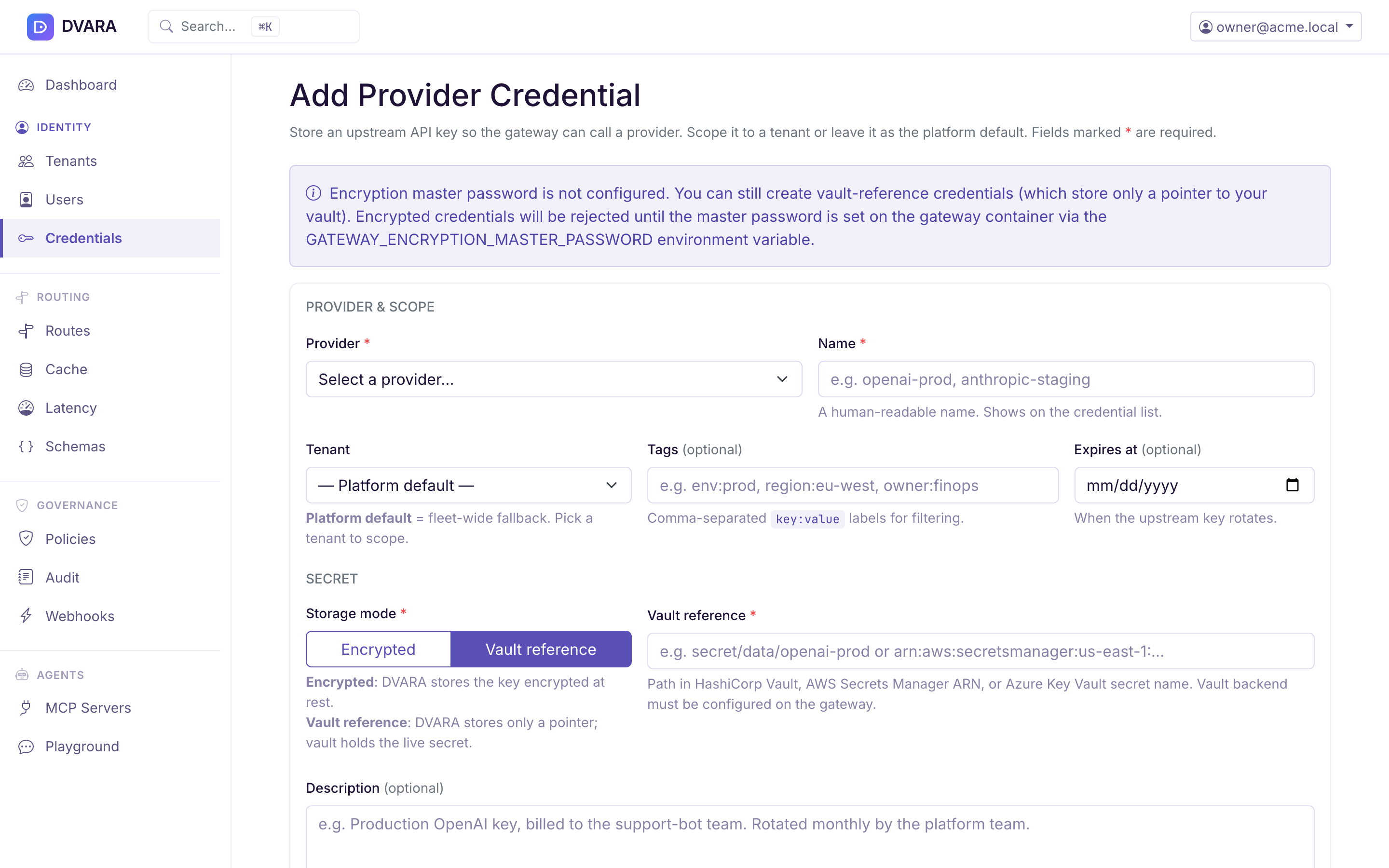
Click New Credential to open the create form. Fields fall into three groups:
Identity
- Provider — dropdown of known providers (
openai,anthropic,gemini,bedrock,azure-openai,mistral,cohere,groq,qwen,deepseek,moonshot,chatglm,grok). Pick this first; the form selects the correct credential field. Azure OpenAI's resource base URL is deployment configuration and does not appear in this form. See Provider Setup for the full list and per-provider notes. - Name — a human-readable label (e.g.
openai-prod,anthropic-staging). - Workspace — leave on Platform default (no workspace) to make this credential a fleet-wide fallback, or pick a workspace to scope the credential so only that workspace's traffic uses it.
- Description (optional) — short free-text note so ops teams can find the right key at a glance when the list grows.
- Tags (optional) — comma-separated labels like
env:prod, region:eu-west, owner:finopsfor filtering the list later. Trimmed and deduplicated on save. - Expires at (optional) — date the upstream provider's key rotates, so DVARA can warn ahead of the cutoff.
Secret
- Which AWS secret (AWS Bedrock only) — Bedrock needs two credentials, one for the Access Key ID and one for the Secret Access Key. The form shows this sub-select only when you pick AWS Bedrock. For every other provider, the underlying resolution key is auto-filled and there's nothing to configure here.
- Storage mode — Encrypted (default when a master password is configured) or Vault reference.
- Encrypted: DVARA stores the key at rest, encrypted. End-to-end management in DVARA.
- Vault reference: DVARA stores only a pointer; the live secret stays in your vault and is fetched per request. Right choice when your security policy forbids storing secrets outside the vault.
- API key (Encrypted mode only) — the actual secret. Encrypted before storage and never shown again.
- Vault reference (Vault mode only) — vault pointer (e.g.
secret/data/openai-prodfor HashiCorp,arn:aws:secretsmanager:us-east-1:...for AWS,openai-prod-keyfor Azure Key Vault).
Actions
Cancel (left) and Create Credential (right) live in a footer row at the bottom of the form.
Plaintext input is wiped from the DOM after submission. ENCRYPTED credentials show a masked prefix in subsequent detail views; REFERENCE credentials show the vault reference path (which is not itself a secret).
Creating a REFERENCE credential: choose REFERENCE as the storage mode on the same form and give the vault path instead of a secret. DVARA stores only the pointer — the secret itself never enters the database.
Only a platform operator can create or rotate a REFERENCE credential. The workspace-scoped credential form does not expose that storage mode. A workspace-owned MCP server or A2A agent must name the credential's secret key, not its vault path. A workspace reference cannot borrow a platform credential to satisfy strict BYOK.
The stored row carries the vault pointer and no ciphertext field at all:
{
  "id": "cr_7f3b1e94-...",
  "name": "OpenAI Production (zero-trust)",
  "provider": "openai",
  "secret_key": "provider.openai.api-key",
  "storage_mode": "REFERENCE",
  "secret_reference": "secret/data/openai-prod",
  "masked_key": null,
  "status": "ACTIVE",
  "workspace_id": "workspace-a",
  "created_at": "2026-04-17T15:00:00Z"
}
Mix-ups are rejected with precise error codes, all returned as 400 Bad Request with type: "invalid_request_error":
| Code | When it fires |
|---|---|
CREDENTIAL_API_KEY_MISSING | storageMode=ENCRYPTED but api_key omitted, or rotating an ENCRYPTED credential without an api_key |
CREDENTIAL_REFERENCE_MISSING | storageMode=REFERENCE but secret_reference omitted, or rotating a REFERENCE credential without a secret_reference |
CREDENTIAL_STORAGE_MODE_MISMATCH | Both api_key and secret_reference set, or the rotate endpoint receives the wrong field for the credential's current mode |
INVALID_STORAGE_MODE | storage_mode is not one of ENCRYPTED or REFERENCE |
CREDENTIAL_NOT_ROTATABLE | Rotating a credential that is not ACTIVE (already GRACE, SUPERSEDED, or REVOKED) |
CREDENTIAL_NOT_FOUND | Returned as 404 when the credential id doesn't exist |
ENCRYPTION_NOT_CONFIGURED | Creating an ENCRYPTED credential on a deployment that has no master password configured — the response suggests switching to REFERENCE mode instead |
Rotate a credential
Click Rotate on any active credential to open a modal. The modal shows one of two inputs depending on the credential's storage mode:
- ENCRYPTED row — paste a new API key. Encrypted with AES-256-GCM and stored in place of the old ciphertext.
- REFERENCE row — paste a new vault pointer. The old row is superseded; the new row points at the new vault location. The live value is resolved from the vault on the next request — DVARA never sees it.
Both kinds of rotation also accept an optional grace period in minutes.
On submit, DVARA performs an atomic rotation:
- For ENCRYPTED: the new API key is encrypted with AES-256-GCM. For REFERENCE: no encryption — only the pointer changes.
- In a single database transaction the current credential is transitioned (see "Immediate vs grace rotation" below) and a brand-new
ACTIVEcredential is inserted. The new row carries aprevious_credential_idreference back to the old one, forming a lineage chain. Storage mode is inherited from the old row and cannot change mid-rotation. - The cached entry for this workspace and provider is evicted. For REFERENCE credentials, the cached vault value keyed by the old reference path is also evicted — so a vault-backed deployment doesn't keep serving the stale cached secret until the vault cache TTL expires.
- Subsequent requests pick up the new credential on their next resolution.
- A
PROVIDER_CREDENTIAL_ROTATEDaudit event is written whosecredential_idpayload is the new (now-active) credential's ID. The payload also carriesstorage_mode(ENCRYPTEDorREFERENCE) so compliance queries can filter "how many rotations were zero-trust". When a grace period was supplied, the payload also carriesgrace_period_minutesand theprevious_credential_idof the row now inGRACE. - From 1.9.0, if MCP servers use this credential (their Credential Ref names its secret key), an
MCP_CREDENTIAL_ROTATEDevent is also written for each of them. It carries a fingerprint of the old and the new key, never the key. A rotation that is refused or fails writesMCP_CREDENTIAL_ROTATION_FAILEDfor each such server. Each gateway writesMCP_CREDENTIAL_IN_USEwhen it starts sending the new key to a server.
Rotation is atomic: concurrent rotation attempts cannot leave two active credentials in the same workspace, provider, and secret-key slot.
Only ACTIVE credentials can be rotated. Calling rotate on a credential that is already GRACE, SUPERSEDED, or REVOKED returns an error (CREDENTIAL_NOT_ROTATABLE) — the successor ACTIVE row is the one that rotates. The DVARA Flightdeck hides the Rotate button for non-active rows, and the REST API rejects the call before any state change.
Immediate vs grace rotation
grace_period_minutes on the rotate request selects between two transition shapes:
| Value | Old row's post-rotation status | Behaviour |
|---|---|---|
0 (default) | SUPERSEDED with superseded_at set | The old key becomes dead immediately; the new key is the only one that resolves. Use when you have already rotated the key at the upstream provider. |
1–1440 | GRACE with grace_until = NOW() + N minutes | The new key is the primary resolution target. If you discover the new key is wrong (typo, wrong environment, already revoked upstream) and revoke it within the grace window, the resolver automatically falls back to the old GRACE row, keeping traffic flowing while you roll back. Once grace_until passes, a scheduled sweep flips the row to SUPERSEDED and emits a CREDENTIAL_GRACE_EXPIRED audit event. |
Typical rollout: staged operators use a 10–15 minute grace window for production rotations. That leaves enough time to watch error rates on the DVARA Flightdeck dashboard and revoke the new key if something looks off — without scheduling a formal maintenance window.
The grace fallback is one-way: if the active row is revoked during grace, the grace row takes over; but once the grace window closes, the old key is gone. Grace does not extend indefinitely and does not survive a second rotation — rotating again within the window takes the current active row through the transition fresh.
The old credential is not deleted — it stays in the database as lineage history. To trace a rotation chain, follow previous_credential_id from the current ACTIVE row back through the GRACE or SUPERSEDED rows until you hit null. To discard history entirely, delete the superseded rows (they are never resolved at request time; deleting them is safe).
Rotating with a grace window: use Rotate on the credential's row and set the grace period. The old credential moves to
GRACE and keeps resolving until it expires, so in-flight work is not cut off; a scheduled
sweep then moves it to SUPERSEDED.
Response:
{
  "id": "cr_7f3b1e94-2a5d-4c88-9e21-d8f0ab4c3e62",
  "workspace_id": "workspace-a",
  "name": "OpenAI Production",
  "provider": "openai",
  "secret_key": "provider.openai.api-key",
  "masked_key": "***encrypted***",
  "status": "ACTIVE",
  "previous_credential_id": "cr_1b2a3c4d-5e6f-7890-abcd-1234567890ab",
  "created_at": "2026-04-17T14:32:11Z",
  "updated_at": "2026-04-17T14:32:11Z"
}
Opening the old credential now shows:
{
  "id": "cr_1b2a3c4d-5e6f-7890-abcd-1234567890ab",
  "status": "GRACE",
  "grace_until": "2026-04-17T14:47:11Z",
  "previous_credential_id": null
}
If a rollback is needed — say the new key turns out to be invalid — revoke cr_7f3b1e94. The resolver will fall back to the grace row and requests continue to succeed until 14:47:11Z. If no rollback is needed, the grace row transitions to SUPERSEDED at 14:47:11Z automatically and a CREDENTIAL_GRACE_EXPIRED audit event fires.
The previous_credential_id points at the just-superseded row. Opening it returns the prior row with status: "SUPERSEDED" and superseded_at set — useful for compliance audits that need to attest "the key active on date X was key Y".
Revoke a credential
Click Revoke to flip the credential's status to REVOKED. Subsequent resolution calls skip it. If no usable workspace credential remains, normal fallback rules apply; this differs from an existing credential that cannot be read, which is refused with workspace_credential_unavailable. Revocation is permanent — there is no reactivation path. A revoked credential stays in the database so you have an audit trail. If you need to restore service, create a new credential.
Delete a credential
Click Delete to permanently remove a credential row. Irreversible. Requires confirmation.
Vault backends
If you'd rather store secrets in a dedicated vault instead of the DVARA database, DVARA ships integrations for three backends. Enable one by setting dvara.vault.backend. The backend is queried on demand and results are cached for dvara.vault.cache-ttl-seconds (default: 300).
HashiCorp Vault
DVARA_VAULT_BACKEND=hashicorp
VAULT_ADDR=https://vault.example.com:8200
VAULT_NAMESPACE=my-namespace                          # optional
VAULT_SECRET_PATH=secret/data/dvara                 # default
VAULT_AUTH_METHOD=approle                             # or 'token'

# Token auth:
VAULT_TOKEN=hvs.CAESIJ...

# AppRole auth:
VAULT_ROLE_ID=...
VAULT_SECRET_ID=...
AWS Secrets Manager
DVARA_VAULT_BACKEND=aws-secrets-manager
AWS_VAULT_REGION=us-east-1
AWS_SECRET_NAME=dvara/provider-credentials          # default

# Optional — falls back to the default AWS credential chain if blank:
AWS_VAULT_ACCESS_KEY=...
AWS_VAULT_SECRET_KEY=...
The secret payload must be a JSON object where each key matches the env-var name DVARA expects:
{
  "OPENAI_API_KEY": "sk-...",
  "ANTHROPIC_API_KEY": "sk-ant-..."
}
Azure Key Vault
DVARA_VAULT_BACKEND=azure-key-vault
AZURE_VAULT_URL=https://my-vault.vault.azure.net/
AZURE_CLIENT_ID=<client-id>
AZURE_CLIENT_SECRET=<client-secret>
AZURE_TENANT_ID=<tenant-id>
The tenant ID is the Microsoft Entra tenant that owns the app registration. It is not a DVARA workspace ID.
Each provider key is stored as a separate secret in the vault, named after the env-var DVARA expects (OPENAI-API-KEY, etc. — Azure Key Vault replaces _ with -).
Precedence
Vault is step 3 in the resolution chain, which means a database-stored workspace credential always wins over a vault value. Use the vault for platform-default keys (steps 1–2 miss because the workspace has no credential record) or for dev / CI environments where you don't want to manage credentials through the DVARA Flightdeck.
If HashiCorp Vault or Azure Key Vault becomes unreachable, DVARA keeps serving
the last value it read successfully for up to dvara.vault.cache-ttl-seconds
(default 300). It does not switch to an environment or property value during
that outage. The fallback is used only when the vault successfully reports that
the secret does not exist.
Master encryption password
Database-backed credentials are encrypted with AES-256-GCM using a key derived from DVARA_ENCRYPTION_MASTER_PASSWORD via PBKDF2. Set this in your environment before starting the gateway:
DVARA_ENCRYPTION_MASTER_PASSWORD=<random-32-char-or-longer-string>
If this password is ever rotated, every existing credential must be re-encrypted — there's no automatic re-key. The recommended flow is:
- Note the credential metadata from the Credentials page (values stay encrypted; nothing exports the secret)
- Rotate
DVARA_ENCRYPTION_MASTER_PASSWORDin your secret store - Redeploy with the new password
- Re-create each credential with its original value
For that reason, treat the master password as a long-lived secret and store it in the same vault you use for other bootstrap secrets.
API summary
| Action | Where |
|---|---|
| Create, list, view | Credentials; Flightdeck applies the signed-in user's role and workspace scope |
| Rotate (evicts the cache) | Rotate on the credential's row |
Revoke (status → REVOKED) | Revoke on the row |
| Delete permanently | Delete on the row — workspace admin or platform owner |
Full config reference for vault backends: Configuration → Enterprise vault config.